
RAG vs MCP vs AI Agents: Which Is Best to Automate Your Business?

The short answer
No single one is “best”. RAG makes AI know your business, MCP connects AI to your software, and AI Agents let AI do the work. The businesses getting real results use them together, in that order.
Every week a new AI buzzword lands in your inbox. Vendors pitch “RAG chatbots”, “MCP integrations” and “autonomous agents” as if each one alone will transform your company. For a business owner, the real question is simpler: which of these will save my team hours, cut errors and grow revenue?
This guide explains each technology in plain language, shows where it fits in a real business, compares them side by side, and gives you a step-by-step roadmap to start automating.
1. RAG: AI that knows your business
RAG (Retrieval-Augmented Generation) lets an AI model answer questions using your documents instead of only its general training. Ask a normal chatbot about your refund policy and it guesses. Ask a RAG system and it first finds the right page in your policy PDF, then writes the answer from it, often with a link to the source.
How RAG works
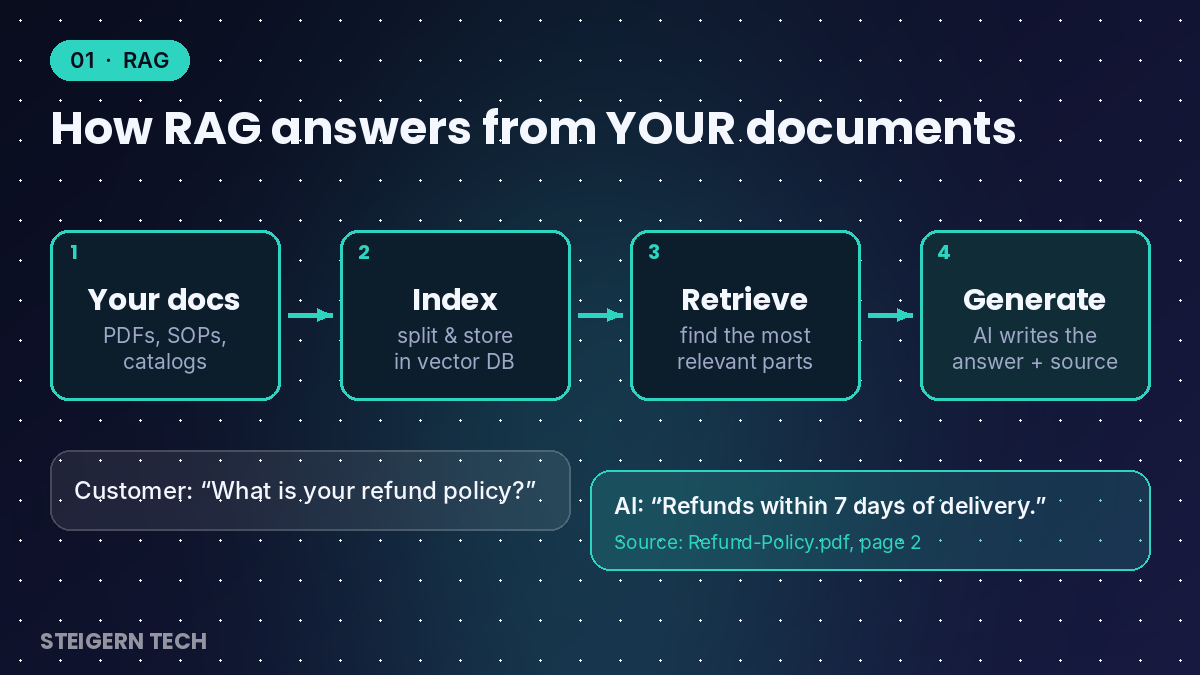
- Collect: your PDFs, manuals, SOPs, product catalogs, past tickets and website pages are gathered.
- Index: the content is split into small chunks and stored in a searchable “vector database”.
- Retrieve: when someone asks a question, the system finds the most relevant chunks.
- Generate: the AI writes a clear answer using only those chunks, and can cite them.
Where RAG helps a business
- Customer support bots on your website or WhatsApp that answer from your real policies and product data.
- Internal knowledge assistant so staff stop searching shared drives for HR rules, SOPs or pricing sheets.
- Sales enablement: reps get instant, accurate answers on specs, comparisons and past proposals.
- Compliance and legal lookups across contracts, circulars and regulations.
Pros and limits
| Pros | Limits |
|---|---|
| Fastest and lowest-cost way to start with AI | Only as good as your documents: outdated files give outdated answers |
| Reduces made-up answers by grounding the AI in your data | Reads information; it does not take actions in your software |
| Answers can show their source, which builds trust | Live data (today’s stock, open orders) needs a connection, which is where MCP comes in |
Best for: businesses with lots of knowledge locked in documents and repeated questions from customers or staff.
2. MCP: AI that connects to your software
MCP (Model Context Protocol) is an open standard that lets AI assistants plug into your business tools, such as your CRM, ERP, Google Sheets, email, database or billing system, in a safe and consistent way. Think of it as a USB-C port for AI: build the connector once, and any compatible AI model can use it.
MCP was introduced by Anthropic in late 2024. In December 2025 it was donated to the Agentic AI Foundation under the Linux Foundation, co-founded by Anthropic, Block and OpenAI with support from Google, Microsoft and AWS. At that point it had more than 10,000 public MCP servers and is supported in ChatGPT, Gemini, Microsoft Copilot, Cursor and VS Code (Anthropic). In short, it is becoming the industry’s common language for connecting AI to software.
How MCP works
- MCP server: a small connector is built for each system (for example, your ERP). It exposes safe “tools” like get pending orders or create invoice, and decides what the AI is allowed to see and do.
- MCP client: the AI app (a chatbot, an assistant or an agent) discovers those tools.
- Live request: when a user asks “Which orders are pending today?”, the AI calls the tool, gets live data, and answers.
Where MCP helps a business
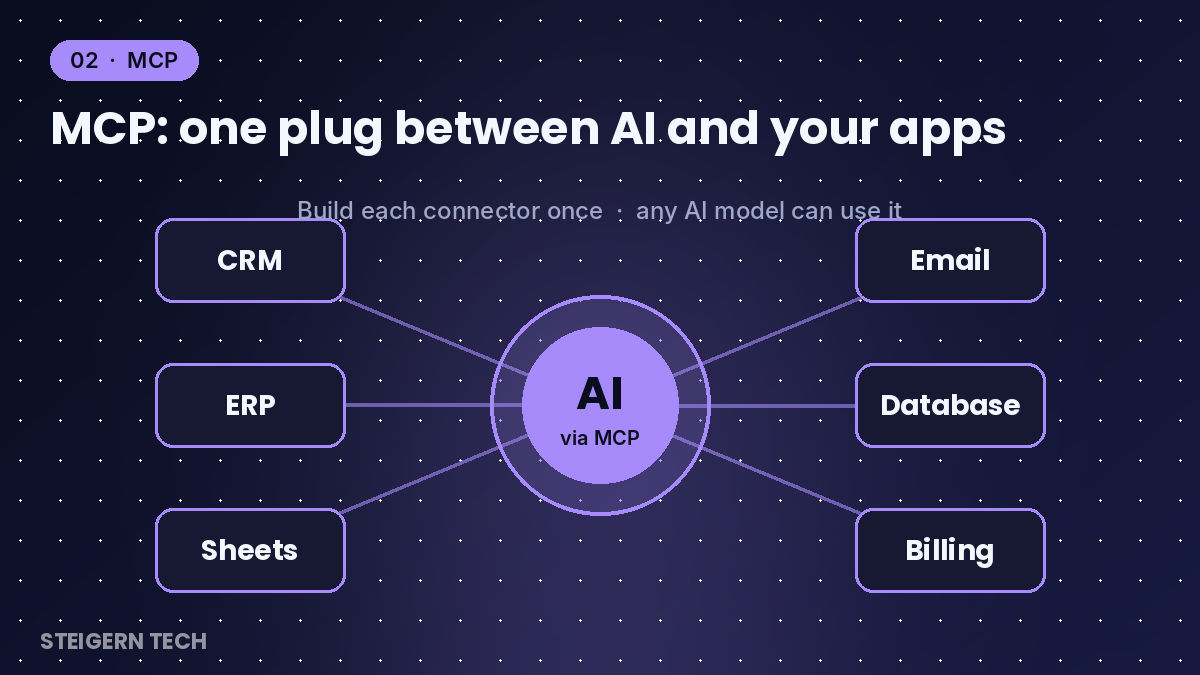
- Live answers from your systems: stock levels, order status, outstanding payments, today’s sales.
- Actions in your apps: create a lead in the CRM, add a row to a sheet, raise an invoice, send a follow-up email.
- One integration, many AIs: you are not locked into a single AI vendor.
- Controlled access: permissions sit in the connector, so the AI only touches what you allow.
Pros and limits
| Pros | Limits |
|---|---|
| Real-time data instead of stale document copies | Needs developer work to build secure connectors for custom or legacy software |
| Open standard backed by the major AI companies | Connects and acts on request, but does not plan multi-step work on its own |
| Reusable: one connector serves many AI apps | Permissions and logging must be designed carefully |
Best for: businesses whose key data lives in software (ERP, CRM, POS, accounting) and who want AI to work with that data live.
3. AI Agents: AI that does the work
An AI Agent is an AI system that is given a goal, not just a question. It plans the steps, uses tools (often through MCP), checks the results and keeps going until the job is done, asking a human for approval where needed.
A chatbot answers “What is this lead’s budget?”. An agent receives a new lead and handles it: reads the enquiry, checks your price list, drafts a personalised reply, updates the CRM, books a meeting and alerts your sales manager.
How an AI Agent works
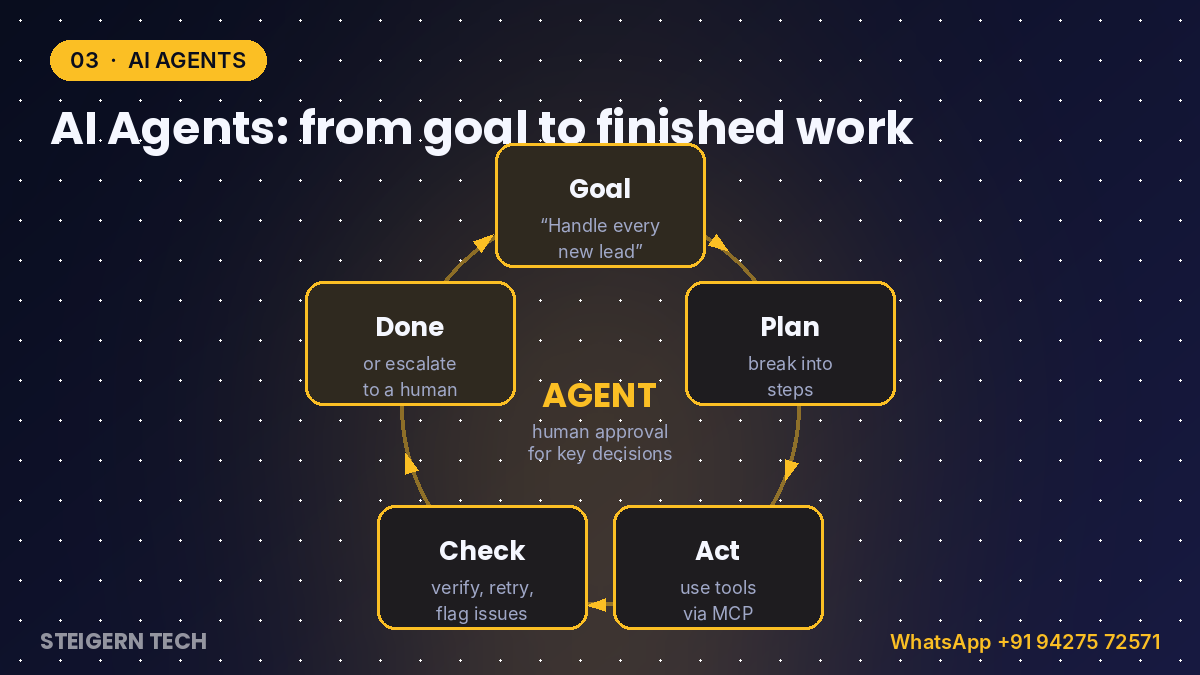
- Goal: “Process every new invoice in the inbox.”
- Plan: the agent breaks it into steps: read email, extract details, match the purchase order, enter it in accounts.
- Act: it uses tools and connectors to do each step.
- Check: it verifies the result, retries or flags anything unusual.
- Escalate: exceptions and high-value decisions go to a person for approval.
Where AI Agents help a business
- Lead management: instant replies, qualification, CRM updates and follow-ups, 24×7.
- Order and invoice processing: read documents, match records, post entries and flag mismatches.
- Customer service: resolve tickets end to end, such as order tracking, returns and rescheduling.
- Reporting: pull data from several systems every morning and send a summary to managers.
- Back-office routines: reconciliation, reminders, data cleanup and document filing.
Pros and limits
| Pros | Limits |
|---|---|
| Automates complete processes, not just answers | Highest build effort: needs clear process rules, tools and testing |
| Works around the clock and scales without new hires | Needs guardrails, approval steps and monitoring to stay safe |
| Combines knowledge (RAG) and connections (MCP) | Works best on well-defined, repeatable processes |
Best for: businesses with high-volume, repeatable, multi-step processes that currently eat up staff hours.
RAG vs MCP vs AI Agents: side by side
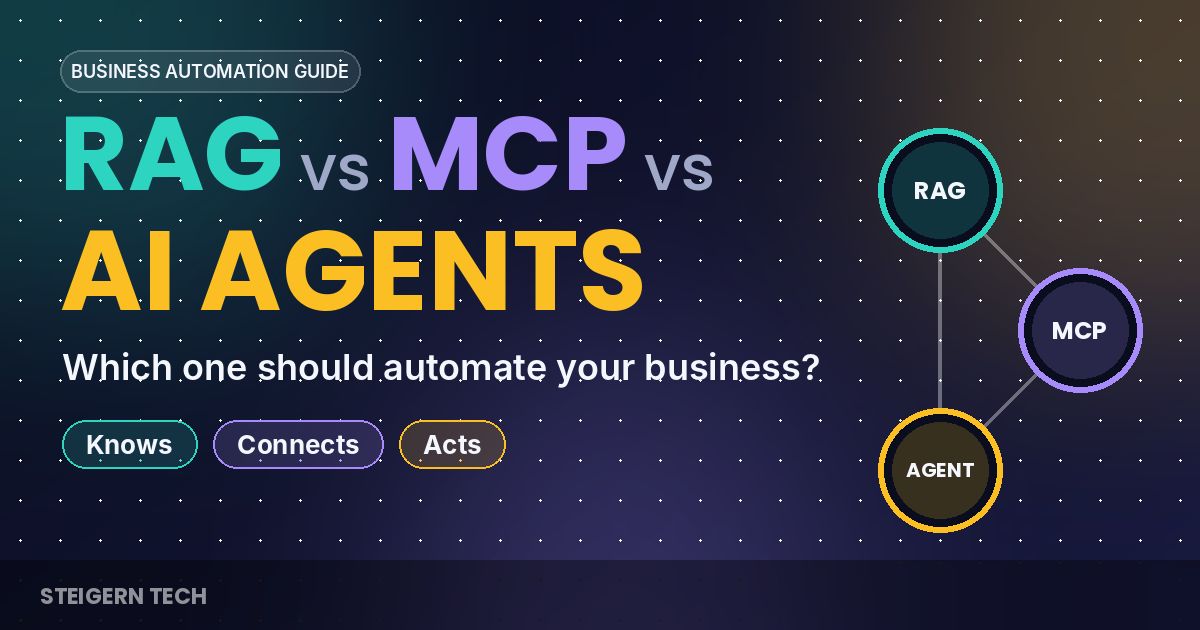
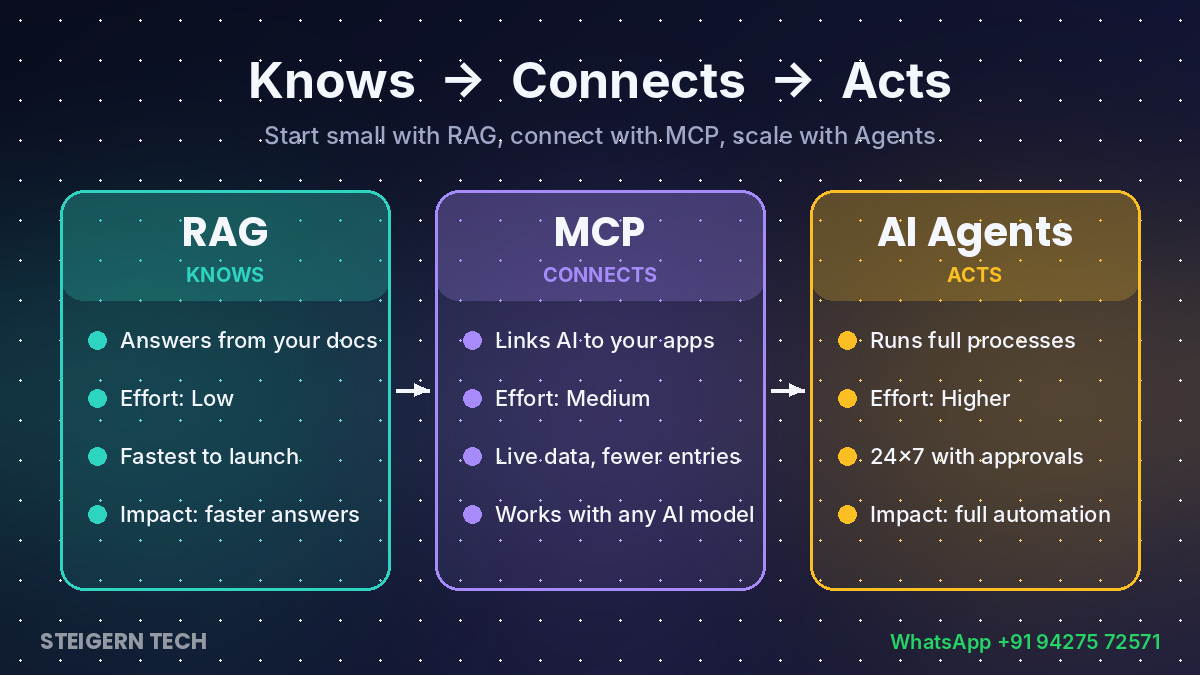
RAG knows, MCP connects, and Agents act. Each one builds on the one before it.
| RAG | MCP | AI Agents | |
|---|---|---|---|
| Core job | Answers from your documents | Connects AI to your apps and live data | Completes multi-step tasks on its own |
| Works with | PDFs, SOPs, catalogs, websites | CRM, ERP, POS, Sheets, email, databases | Documents, apps and tools together |
| Takes actions? | No, it informs | Yes, when asked | Yes, plans and acts end to end |
| Build effort | Low | Medium | Higher |
| Typical time to first version | Days to a few weeks | A few weeks | A few weeks to months |
| Main risk | Outdated documents | Access permissions | Wrong actions without guardrails |
| Business impact | Faster, accurate answers | Live data and fewer manual entries | Whole processes automated |
| Example | “What is our return policy?” | “Show today’s pending orders from ERP” | New lead → reply → CRM → meeting booked |
Timelines are typical ranges for a focused first version and vary with data quality and the number of systems involved.
Which one should your business choose?
Start from the problem, not the technology. Match your biggest pain point to the right tool:
| If your problem is… | Start with | Why |
|---|---|---|
| Customers and staff keep asking the same questions | RAG | Instant, accurate answers from your own documents |
| Staff waste time searching files, policies and old proposals | RAG | One search box for all company knowledge |
| Managers keep asking for numbers from ERP, CRM or Sheets | MCP | Live data on demand, without manual reports |
| Your team copies data between apps by hand | MCP, then Agents | Connect the apps first, then automate the transfer |
| Leads go cold because replies are slow | AI Agent | 24×7 response, qualification and follow-up |
| Invoices, orders or tickets pile up every day | AI Agent | End-to-end processing with human approval for exceptions |
The winning setup uses all three
The strongest automations combine them. Take a WhatsApp sales assistant for a retail or distribution business:
- RAG gives it knowledge of your catalog, prices, schemes and return policy.
- MCP connects it to your ERP for live stock and to your CRM for customer history.
- The Agent handles the conversation, creates the order, sends a payment link, updates the CRM and alerts your team only when needed.
Remove any one layer and it breaks: without RAG it gives wrong product details, without MCP it cannot check stock, and without the agent someone still has to do the work by hand.
A simple rule of thumb
Start small with RAG, connect with MCP, scale with Agents. Each step pays for itself and prepares your data and systems for the next one.
How to implement AI automation: a 6-step roadmap
- Pick one painful process. Choose something frequent, rule-based and measurable, such as answering product enquiries or entering invoices. Note how many hours it takes today.
- Organise your knowledge. Collect the documents the process depends on, remove outdated versions and launch a RAG assistant on them.
- Connect your systems. Build MCP connectors to the software involved (ERP, CRM, accounts, Sheets) with read-only access first, then carefully allowed actions.
- Automate with an agent, keeping a human in the loop. Let the agent run the process end to end, with approval steps for payments, discounts and anything unusual.
- Measure the results. Track hours saved, response time, error rate and conversions against your starting numbers.
- Scale what works. Reuse the same knowledge base and connectors for the next process. Every new automation gets cheaper and faster to build.
Frequently asked questions
Is RAG the same as training my own AI model? No. RAG does not retrain the model. It looks up your documents at the moment of the question, so updating the answer is as simple as updating the document.
Is MCP only for developers? Developers build the connectors, but the people using them simply chat or work with an AI assistant. Once a connector exists, any MCP-compatible AI tool can use it.
Are AI agents safe to run on business data? They are when designed properly: limited permissions, approval steps for sensitive actions, activity logs and testing before go-live. Start agents on low-risk tasks and widen their scope as trust grows.
Can small businesses afford this? Yes. A RAG assistant on your existing documents is one of the lowest-cost ways to start, and it often pays back quickly through time saved on repeated questions.
Will AI replace my staff? In practice, it removes repetitive work such as copying data, answering the same questions and chasing follow-ups, so your team can focus on customers, sales and decisions.
Does it work with WhatsApp and Indian business software? Yes. Assistants can run on WhatsApp, your website or internal tools, and connectors can be built for most ERPs, CRMs, accounting and billing systems, including custom ones.
Ready to automate? Steigern Tech can help
Steigern Tech designs and builds AI automation for growing businesses, from RAG knowledge assistants and MCP connectors for your ERP and CRM to AI agents that run complete processes with human approval built in.
Tell us one process that eats up your team’s time, and we’ll show you which approach fits and what it can save.
WhatsApp us: +91 94275 72571 for a free consultation.